Hi everyone, here are the Local History Photos of the Week!
–
Local History & Newspaper blog posts are published on Fridays; and the next post will be up on Friday, March 15, 2024.
–
Helpful Photo Viewing Tips are found at the end of the posting for anyone who would like a few tips on how best to view the photos*
–
And this week, to try and get the word out that the library’s Local History Photo Archive is available online, I’m going to offer a way to access all the photos in our local history photo archive online.
How to browse the library’s Local History Photo Archive online
1. Go to the Corning History blog found at corningnyhistory.com
2. Click on Local History Photo Archive (seen bordered in red in the photo)

The Local History Photo Archive page will display, as seen in the photo below
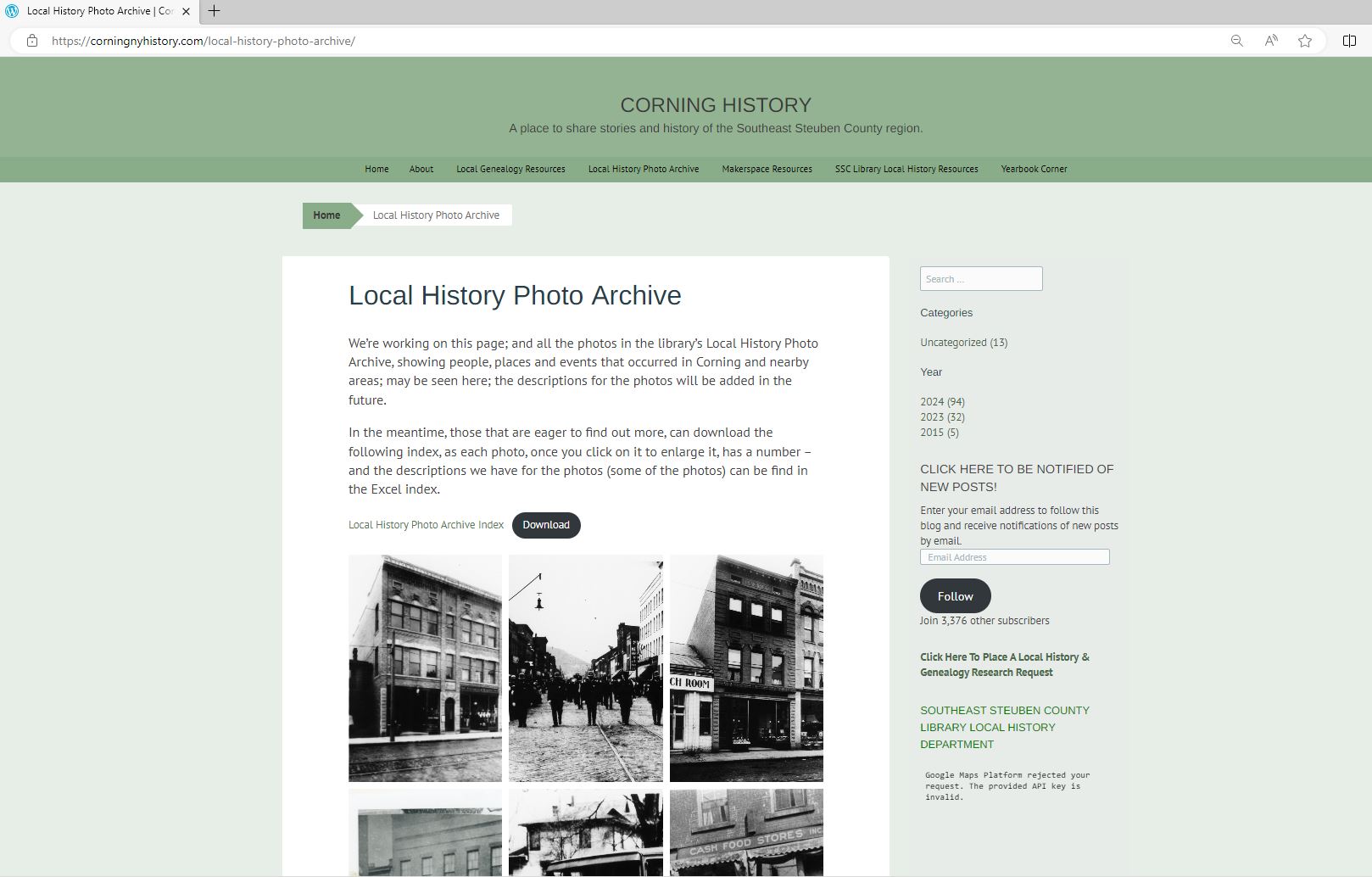
Then browse away!
Note: Depending upon your Internet connection speed – the page may take a little longer than normal to load.
–
A Glimpse of Local Life: A Hundred Years Ago!
Here is an entire issue of The Evening Leader, Corning, N.Y. published on this day in 1924.
–
The Evening Leader, Corning, N.Y. | March 8, 1924
–
Have a great weekend everyone,
Linda Reimer, SSCL
–
Local History Online Library Resources:
Heritage Quest: Heritage Quest is the library’s online genealogy service, and it includes access to census records and other research sources; it can be accessed by going to the Online Resources page, on the library’s website, and scrolling down until you see the link for Heritage Quest:
https://www.ssclibrary.org/research/online-resources/
Once you’ve clicked on the Heritage Quest link, you’ll be prompted to login with your card number and PIN. If you have questions about how to use Heritage Quest, please feel free to let me know – my email address is reimerl@stls.org
–
Enjoy the photos and be well everyone,
Linda Reimer, SSCL
–
*To Create A Larger View (make the photos appear bigger on your screen):
You can click on each photo for a larger view. And then click the back arrow on your web browser to go back to the previous screen.
Alternatively, you can press and hold down the CTRL key, on your keyboard, while tapping the + key on your keyboard to make the photos appear larger on your screen.
–
To Create A Smaller View (make the photos appear smaller on your screen – after you’ve made them appear larger):
Press and hold the CTRL key on your keyboard and tap the – sign to make the photos appear smaller again.
–
And If You Use A Mouse – CTRL & Scroll:
If you use a mouse you can do what is called “control and scroll”, to make photos appear larger and then smaller on your screen. To do this –>press and hold down the CTRL key on your keyboard and push the scroll wheel on your mouse away from you for a larger view. To reverse the larger view hold down the same CTRL key on your keyboard and pull the scroll wheel on your mouse towards you.
–
Library Local History/Creation Station Resources:
At the library you can scan your photos and slides to create digital family albums and slideshows; and even use one of the Circut machines, and other Creation Station equipment, to help you create a special paper family history album.
Also of note, we have the local paper, at times called the Corning Leader, Corning Journal or Corning Daily Journal, on microfilm from 1840 to the present — so you can visit the library and research local history and your family tree if you wish!


Local history photo archive doesn’t load. Just keeps skipping when click on. No photos came attached with your ema
LikeLike
Hi, sorry about that – try this link: https://corningnyhistory.com/local-history-photo-archive/
LikeLike
Thanks so much! 😊Working
LikeLike